
Brief Summary
This video explains the technical design of an OData service, focusing on the structure, classes, and how to implement and test the service. It covers creating entity sets and types, using ABAP data elements, and working with model provider (MPC) and data provider (DPC) classes. The video also demonstrates how to redefine methods in the DPC extension class to populate data, debug the service, and view metadata in different formats.
- OData service design involves creating entity sets on top of entity types, which are based on structures with fields (entities).
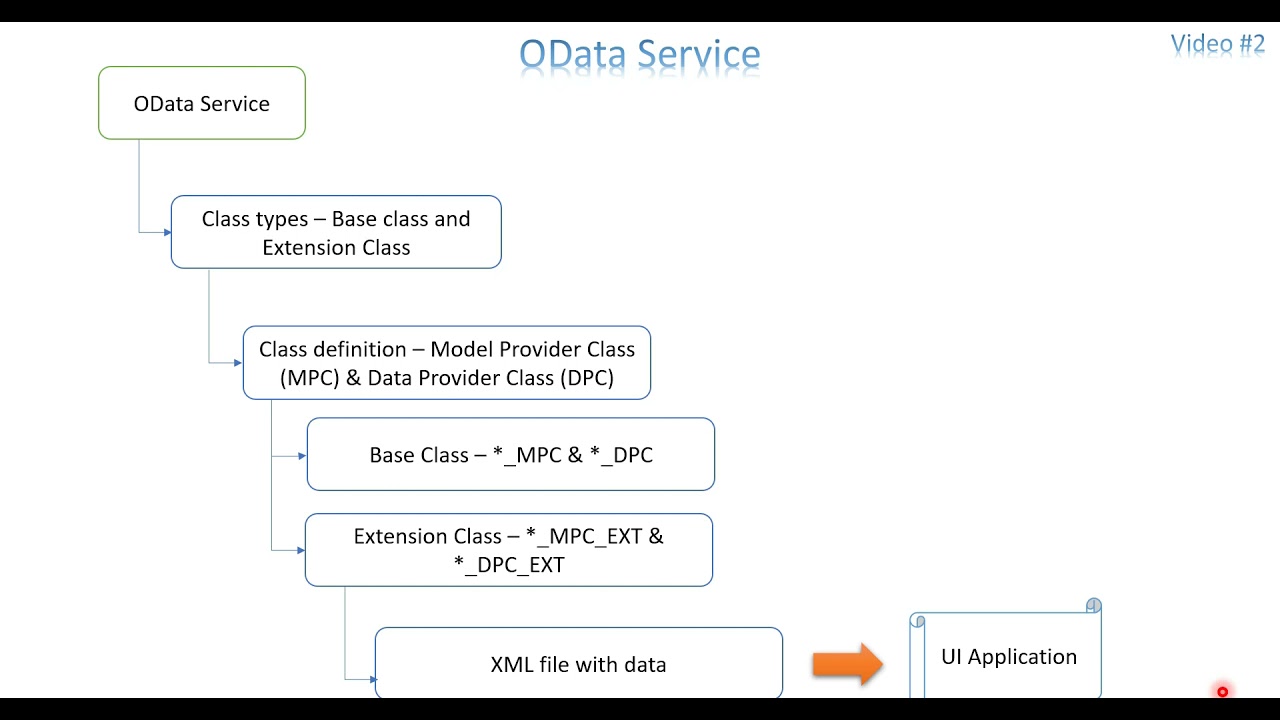
- OData services generate model provider (MPC) and data provider (DPC) classes, with extension classes used for custom logic.
- The DPC extension class is where you redefine methods to populate data into entity sets.
Introduction to OData Service Design
The video introduces the technical design of an OData service, which serves as a communication medium for sending business data to UI applications. It recaps the previous video, emphasizing the need to design the OData service by defining data structures like header and item, and specifying required fields. The video highlights that manual creation of entity types and sets is inefficient, especially when dealing with numerous fields, and introduces the concept of using structures to simplify this process.
Key Components: Entity Sets, Entity Types, and Entities
The video explains the hierarchy of OData service components: entity sets, entity types, and entities. An entity set is created on top of an entity type, which is a structure containing multiple entities (fields). Each entity has technical aspects like data element, length, and decimal places defined in ABAP. The video mentions that these components can be created using standard or custom structures, or by importing a function module, which automatically generates the entity type based on import and export parameters.
OData Service Classes: Model Provider (MPC) and Data Provider (DPC)
The video discusses the classes generated when an OData service is created: model provider class (MPC) and data provider class (DPC). Each has a base class and an extension class. The MPC is used to change the existing structure of the OData service, while the DPC is used to write code to populate values to the entity sets. The DPC extension class is primarily used for writing code and redefining methods to populate data into entity sets.
Designing the OData Service Model
The video illustrates the basic design of an OData service model. It starts with a structure containing multiple fields, which can be a reference structure or manually created. An entity type is created on top of this structure, with each field in the structure representing an entity. Each entity has technical aspects defined. An entity set, which is like an internal table, is created on top of the entity type and can hold multiple records. This entity set is then accessed by the UI application to retrieve data.
Navigating and Modifying OData Service in SAP Gateway Service Builder
The video transitions to a live demonstration in SAP, using transaction code SEGW (SAP Gateway Service Builder) to create and extend an OData service project. It revisits a previously created OData service, showing how the data model was manually created, including entity types (e.g., material structure) and properties (entities). The video explains that properties are the individual fields within an entity type, each with technical specifications like data type and length.
Enhancing Entities with ABAP Data Elements
The video demonstrates how to enhance entities by referring to ABAP data elements. It explains that while using ABAP data elements can lead to a potential loss of data due to restricted values in the domain, it is still a viable option. The video emphasizes the importance of regenerating the project after making changes and ensuring that the runtime objects are green or yellow to avoid errors.
Exploring Runtime Artifacts: Base and Extension Classes
The video explores the runtime artifacts generated after the OData service is created, specifically the base and extension classes for MPC and DPC. It explains that the base classes end with _MPC_DPC, while the extensions end with _MPC_EXT and _DPC_EXT. The video reiterates that most of the work is done in the DPC extension class, where methods are redefined to populate data.
Finding and Redefining Methods in DPC Extension Class
The video demonstrates how to find and redefine methods in the DPC extension class. It explains how to locate the relevant method for a specific entity set (e.g., MAT_ENTITY_SET) and how to redefine it to implement custom logic. The video also shows how to use the inherited methods and the importance of redefining them to write custom code.
Implementing Data Population in Redefined Method
The video walks through the process of redefining a method in the DPC extension class and implementing code to populate data. It explains the importance of the ET_ENTITYSET parameter, which is an internal table that needs to be filled with data. The video also highlights the difference between the names used in the entity type (for UI) and the field names used in the ABAP code.
Testing the OData Service in SAP Gateway Client
The video demonstrates how to test the OData service using the SAP Gateway Client. It shows how to execute the service and retrieve data, and how to resolve the "method not implemented" error by redefining the corresponding method in the DPC extension class. The video also explains how to manually create data and populate the entity set.
Fetching Data from Database and Debugging
The video demonstrates how to fetch data from a database table and populate the entity set. It explains that the DPC extension class is the place to write code to fetch data from various sources like function modules or CDS views. The video also shows how to use external breakpoints to debug the OData service and check the data flow.
Metadata and JSON Format
The video explains how to view the metadata of the OData service, which provides technical details about the data types and key fields. It also demonstrates how to retrieve the data in JSON format by adding the $format=json parameter to the URL, which is useful for testing and development purposes.

