
Brief Summary
This video explains how to use filter options in OData services and design entities from standard or custom SAP structures. It covers creating an SEGW project with header and item entity types, redefining DPC extension class methods, and using the filter option to retrieve data based on input parameters from a UI application. The video also demonstrates how to import properties from a structure, define key fields, and activate the service to test the filter options.
- Creating OData service project
- Redefining DPC extension class methods
- Using filter options to retrieve data
Introduction
The video introduces the concept of using filter options in OData services and designing entities by importing from standard or custom SAP structures. The presenter outlines a scenario where a UI application needs to retrieve purchase order (PO) header and item details from a database based on the PO number. This involves creating an OData service to handle the request and return the appropriate data.
Business Scenario and Design
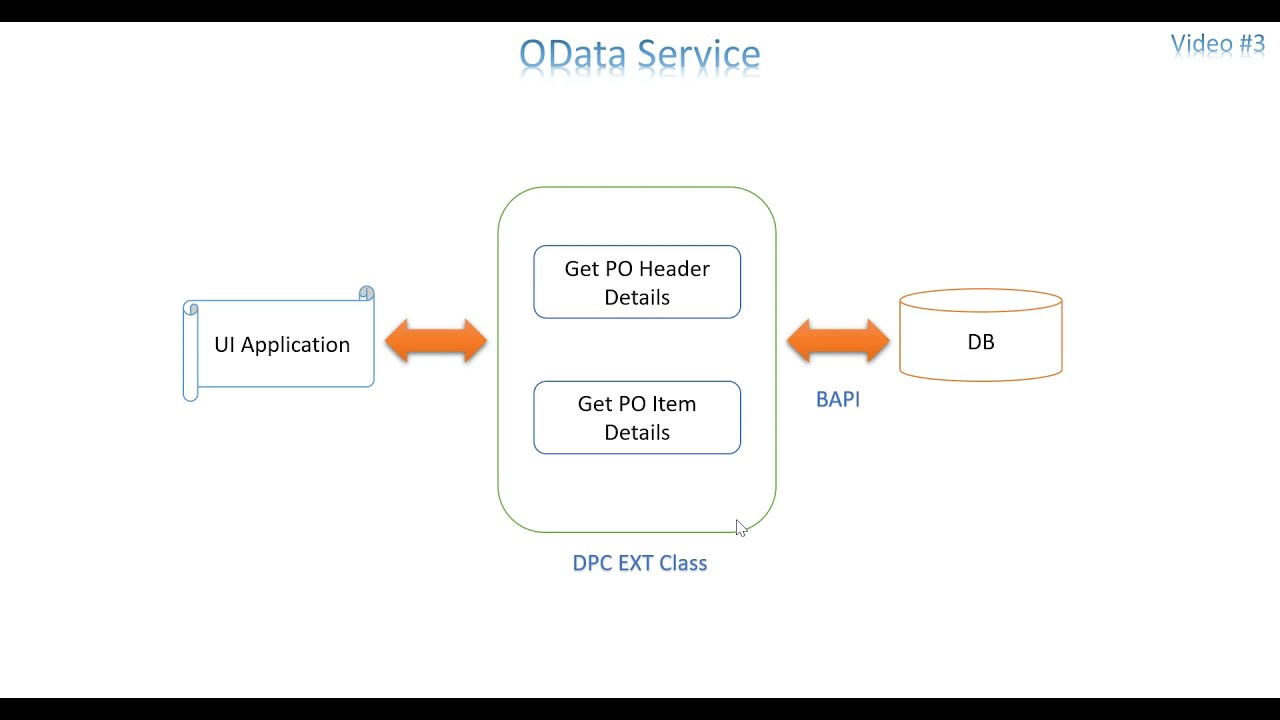
The business scenario involves a UI application requesting PO header and item details based on a PO number. The OData service will use a standard BAPI (BAPI_PO_GETDETAIL) to fetch this information from the database. The presenter emphasizes the importance of designing the OData service structure before coding, which includes defining entity types and sets for PO header and item details. This design will be implemented in the DPC extension class, where the BAPI is called to retrieve the data.
Creating the SEGW Project
The presenter demonstrates creating an SEGW project for the OData service. This involves defining two entity types: one for the PO header and another for the PO item. The entity types are created using standard SAP structures. The presenter explains how to create entity sets, either by default during entity type creation or manually. The video highlights the hierarchy: entity, entity type, and entity set.
Importing Properties from Structures
The video explains how to import properties (fields) from a standard SAP structure into the entity types. This is done by right-clicking on the entity type and selecting "Import Properties." The presenter shows how to select specific fields from the structure and define a key field for each entity type. For the PO header, the PO number is selected as the key field, while for the PO item, both the PO number and PO item number are used as key fields.
Generating the Project and Redefining Methods
After defining the entity types and sets, the presenter generates the SEGW project. This process creates DPC and MPC classes, along with their extensions. The presenter navigates to the DPC extension class and explains the need to redefine certain methods for each entity set. Specifically, the "GetEntitySet" methods for both PO header and PO item are redefined to add custom logic for retrieving data.
Implementing Filter Options
The presenter explains how to use filter options to receive input from the UI application. By setting a breakpoint in the redefined "GetEntitySet" method, the presenter demonstrates how to inspect the method parameters and identify the filter options. The filter options are passed as part of the URL and are accessible through the "IT_FILTER_SELECT_OPTIONS" internal table. The presenter shows how to retrieve the filter values and use them to query the database.
Activating the Service and Testing Filters
The video demonstrates how to activate the OData service using the "Activate and Maintain Services" transaction. After activating the service, the presenter uses the SAP Gateway Client to test the service and pass filter parameters in the URL. The presenter shows how to construct the URL with the filter option to retrieve specific PO header details based on the PO number. The debugging process illustrates how the filter values are received and stored in the internal table.
Coding the Filter Logic
The presenter writes the code to read the filter information from the internal table "IT_FILTER_SELECT_OPTIONS" and retrieve the PO number. The code uses basic ABAP syntax to read the internal table and extract the PO number. The presenter then calls the BAPI "BAPI_PO_GETDETAIL" to retrieve the PO header information based on the PO number. The retrieved data is then appended to the entity set to be returned to the UI application.
Implementing Item Details and Testing
The presenter copies the code from the header entity set method to the item entity set method, making necessary adjustments to retrieve PO item details instead of header details. The BAPI is called, and the item details are appended to the item entity set. The presenter then tests the service with the item entity set, demonstrating how to retrieve item details based on the PO number. The video concludes by emphasizing the flexibility of using filter options to handle various UI input values and retrieve specific data based on those inputs.

