
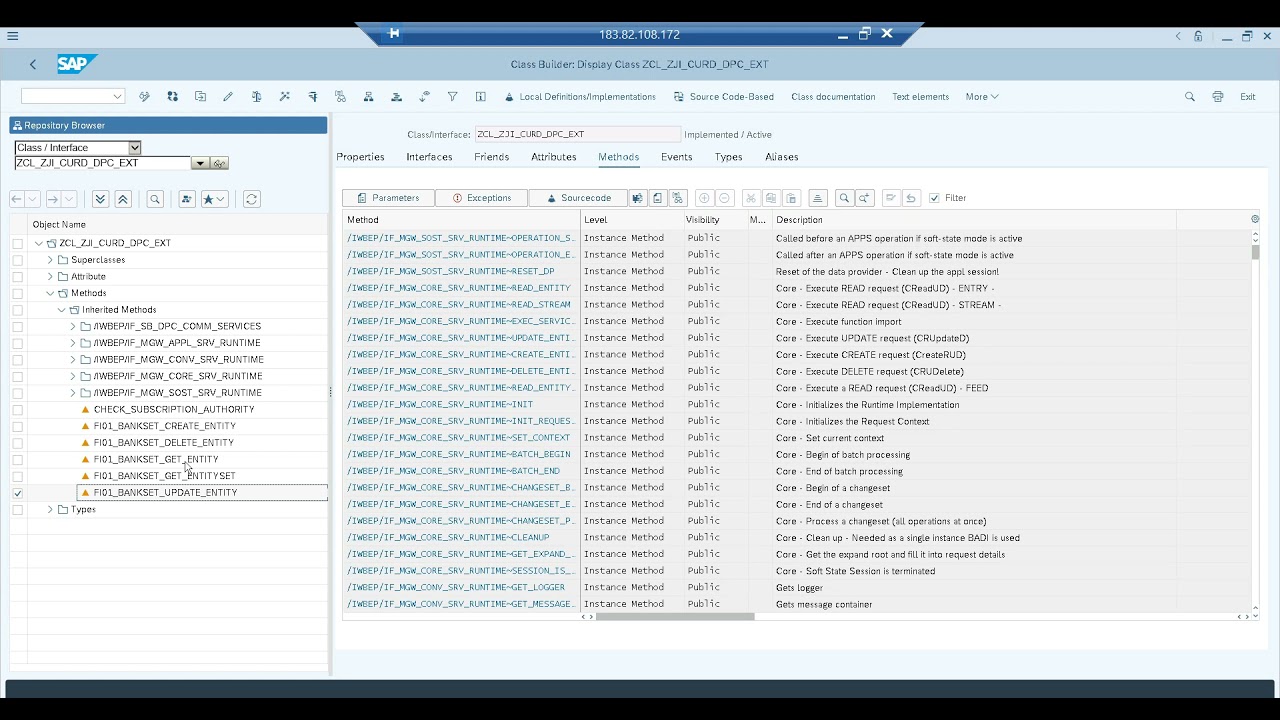
Brief Summary
This video tutorial explains how to implement Create, Update, Read, and Delete (CRUD) operations in OData services using SAP Gateway. It covers the different HTTP methods (GET, POST, PUT, DELETE) and their corresponding DPC methods (GetEntity, GetEntitySet, CreateEntity, UpdateEntity, DeleteEntity). The video also demonstrates how to handle exceptions and test these methods using the SAP Gateway Client.
- Explains CRUD operations in OData services.
- Covers HTTP methods and DPC methods.
- Demonstrates exception handling and testing.
Introduction to CRUD Operations in OData Services
The video introduces the concept of CRUD operations (Create, Update, Read, Delete) in OData services. It mentions that the "Read" operation was covered in previous videos, and this session will focus on "Create," "Update," and "Delete" operations. The presenter outlines the business scenarios and the corresponding methods in the Data Provider Class (DPC) for each operation.
Business Scenarios and HTTP Methods
The presenter explains different business scenarios and the corresponding HTTP methods used to trigger specific DPC methods.
- Read Data by Key Fields: Uses the
GetEntitymethod in DPC, triggered by the HTTP GET method. - Read Data with/without Filter: Uses the
GetEntitySetmethod in DPC, also triggered by the HTTP GET method. The system determines which method to call based on whether key field values are passed in the URI. - Create Data: Uses the
CreateEntitymethod in DPC, triggered by the HTTP POST method. - Update Data: Uses the
UpdateEntitymethod in DPC, triggered by the HTTP PUT method. - Delete Data: Uses the
DeleteEntitymethod in DPC, triggered by the HTTP DELETE method.
Business Process: Bank Creation
The presenter chooses the business process of bank creation using transaction code FA01 to demonstrate the CRUD operations. They mention using BAPIs (Business Application Programming Interfaces) like BAPI_BANK_CREATE and BAPI_BANK_CHANGE for these operations. The focus remains on the OData level implementation, making it applicable to other business scenarios like sales order or purchase order creation.
Designing the OData Service
The presenter discusses the design considerations for the OData service, including the HTTP methods to be used (POST, PUT, DELETE) and how to test these methods. They mention the use of the "Use as Request" option for passing input data for POST, PUT, and DELETE methods. The importance of exception handling is also highlighted, ensuring that exceptions from the backend system are passed back to the UI (Gateway system).
Creating the OData Project
The presenter starts creating an OData project named ZGI_CURD_OPERATIONS in transaction SEGW. A simple structure with four fields (Bank Country, Bank Key, Bank Name, and Region) is created for the entity type F501_BANK. The entity set BankSet is also created.
Defining Properties and Key Fields
The presenter defines the properties for the entity type, including Country and Key as key fields. The data types and labels for these properties are also set. The presenter then navigates to transaction FA01 to show the structure of the underlying database table (BNKA) used for storing bank information.
Implementing GetEntity Method
The presenter redefines the GetEntity method in the DPC extension class. They use a SELECT statement to read the bank information from the BNKA table based on the key fields (Country and Key) passed in the request. The retrieved data is then mapped to the entity structure.
Implementing GetEntitySet Method
The presenter redefines the GetEntitySet method in the DPC extension class. They use a SELECT statement to read multiple bank information from the BNKA table. The retrieved data is then mapped to the entity set structure.
Activating and Testing the OData Service
The presenter activates the OData service and tests the GetEntity and GetEntitySet methods using the SAP Gateway Client. They demonstrate how the system determines which method to call based on whether key field values are passed in the URI.
Implementing CreateEntity Method
The presenter redefines the CreateEntity method in the DPC extension class. They use the BAPI_BANK_CREATE BAPI to create the bank information. The input data is read from the request using the IO_DATA_PROVIDER object and mapped to the BAPI parameters. Exception handling is implemented to pass any errors from the BAPI back to the UI.
Reading Input Data with IO_DATA_PROVIDER
The presenter explains how to read the input data for the CreateEntity method using the IO_DATA_PROVIDER object. They use the READ_ENTITY_DATA method of the IO_DATA_PROVIDER to retrieve the input data as a work area.
Implementing Exception Handling
The presenter implements exception handling in the CreateEntity method. If the BAPI returns an error, a CX_W_MGW_EXCEPTION is raised with the error message from the BAPI. This exception is then passed back to the UI.
Testing the CreateEntity Method
The presenter tests the CreateEntity method using the SAP Gateway Client. They demonstrate how to use the "Use as Request" option to pass the input data for the POST method. The presenter also shows how to handle exceptions and verify that the bank information is created in the backend system.
Implementing UpdateEntity Method
The presenter redefines the UpdateEntity method in the DPC extension class. They use the BAPI_BANK_CHANGE BAPI to update the bank information. The input data is read from the request using the IO_DATA_PROVIDER object and mapped to the BAPI parameters. Exception handling is implemented to pass any errors from the BAPI back to the UI.
Testing the UpdateEntity Method
The presenter tests the UpdateEntity method using the SAP Gateway Client. They demonstrate how to use the "Use as Request" option to pass the input data for the PUT method. The presenter also shows how to handle exceptions and verify that the bank information is updated in the backend system.
Implementing and Testing DeleteEntity Method
The presenter redefines the DeleteEntity method in the DPC extension class. They use the SAP Gateway Client to test the DeleteEntity method using the DELETE HTTP method.

