
Brief Summary
This video explains how to handle deep entity sets in SAP Gateway services, focusing on creating entries in the backend system based on data received from a UI application. It covers the necessary steps for configuring the OData service to receive data in a deep entity format, processing the data to update backend tables, and sending a response back to the UI. The video also provides guidance on creating input files in JSON format for testing the service.
- Explains how to create entries in the backend system based on data received from a UI application.
- Covers the necessary steps for configuring the OData service to receive data in a deep entity format.
- Provides guidance on creating input files in JSON format for testing the service.
Introduction to Deep Entity Sets Part 2
This video is a continuation of a previous video explaining deep entity sets. In the first part, the focus was on sending information from the backend system to the UI application using the deep entity concept. Deep entity sets are used in Gateway services to handle related data models, such as header, item, and shipment details, as a single entity. Instead of using multiple URIs to retrieve information about each data model, the UI can send one request and receive all the related information in a single response.
Reversing the Data Flow: UI to Backend
The video focuses on the reverse order of operations, where the UI sends header and item details to the OData service, which then creates an entry in the backend system. The example used is creating a sales order, where the UI sends header information (work area) and item and shipment details (internal tables). The OData service must be configured to receive this information and use it to create a sales order in the backend system.
Deep Entity Set Structure and the POST Method
The video highlights the use of the POST method for creating entries in the backend system. The UI sends data as a deep entity set, including a header and multiple items and shipments. The OData service must be capable of receiving this information. Once the data is received, it is split into independent internal tables to create the sales order using a BAPI or function module. A return parameter is included in the OData service to send a response back to the UI, indicating whether the creation was successful or not.
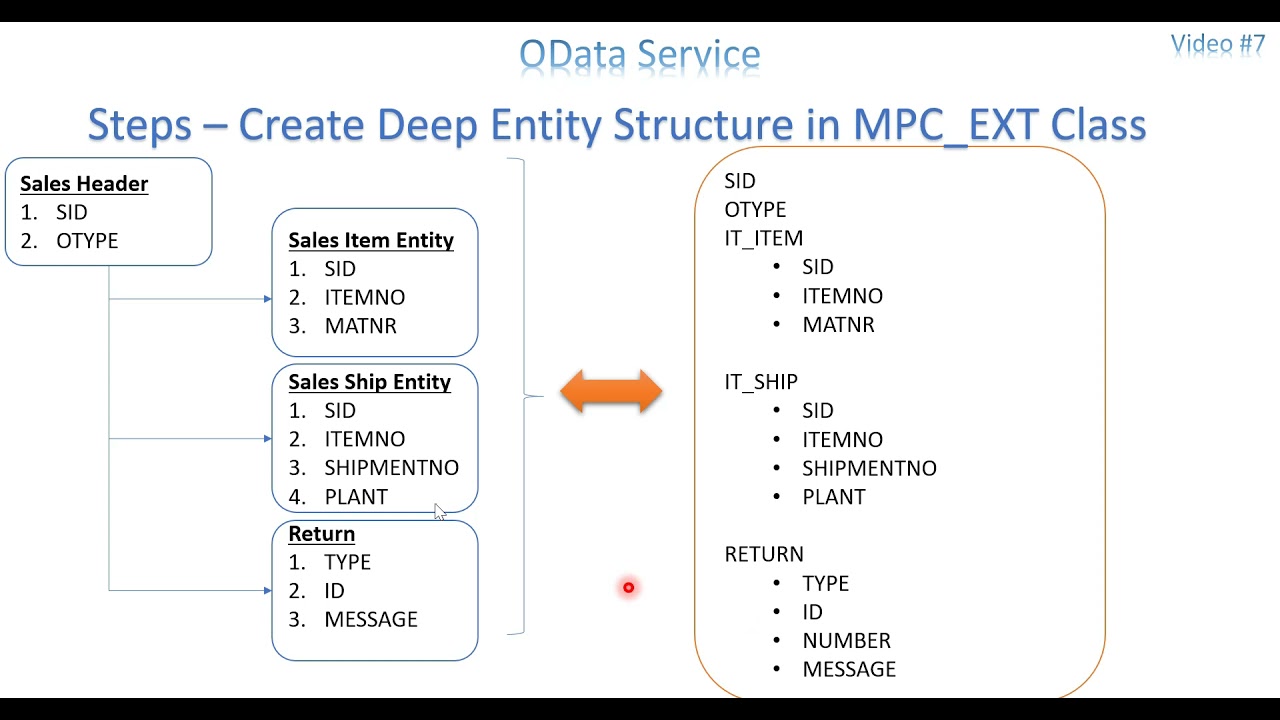
Creating the Deep Entity Structure in MPC Extension Class
The video describes the structure of the deep entity set, which includes header, item, shipment, and return information. The return parameter is essential for POST methods to inform the UI about the success or failure of the operation. The data model in the SEGW project consists of four different data models: header, item, shipment, and return. In the MPC extension class, a structure is created with these components. The return structure includes fields such as type, ID, number, and message, based on the BAPI return structure.
Redefining the Define Method in MPC Extension Class
The video explains the importance of redefining the Define method in the MPC extension class. This involves declaring an object entity type and using the super->define method to carry forward the redefinition. The entity type name (e.g., header) is specified, and the structure of the deep entity from the MPC class is bound to it. This step is crucial for registering the entity set to be called from the UI.
Redefining the Create Deep Entity Method in DPC Extension Class
The video details the process of redefining the Create Deep Entity method in the DPC extension class. This method handles the input from the UI, segregates the data into work areas and internal tables, calls a custom function module to update the backend system, and fills the return information. The UI recognizes the output from the ER_DEEP_ENTITY export parameter, which must be filled with the appropriate data.
Technical Data Flow for Creating Deep Entity
The video outlines the technical data flow for creating a deep entity. The UI input data is transferred using the I_DATA_PROVIDER object and the READ_ENTRY_DATA method. The data is then segregated from the deep entity set into the appropriate internal tables. A function module is called to update the data in the backend system, and the output is gathered and fed into the deep entity set return information. Finally, the data is moved from the deep entity sets to the ER_DEEP_ENTITY internal table using the COPY_DATA_TO_REF method.
Creating the Input File in JSON Format
The video provides a guide on creating an input file in JSON format for testing the deep entity set. The input file includes the header, item, and shipment information. The structure starts with an open parenthesis and includes the field names and values within double quotes. Navigation paths between the header and item/shipment are specified. The format is continuous, with commas separating the different sections. This JSON format simplifies the testing process compared to using XML.
Function Module and Table Design
The video briefly shows the basic function module and tables used for updating the backend system. The function module inserts data into custom tables for header, item, and shipment information. The design emphasizes simplicity, with no complex code. The video concludes by promising a detailed walkthrough of the technical implementation in the next video.

