Turn YouTube Videos into Notes

Stop pausing and typing. Share a lecture or tutorial to Summ and get structured notes with headings, key points and timestamps, plus the full transcript.

Works with YouTube videos, Shorts, podcasts and live replays

How it works

  1. 1

    Paste the video link

    Lectures, courses, explainers, tutorials.

  2. 2

    Get AI notes in Summ

    Headings, bullet points and a short overview, ready to study.

  3. 3

    Keep the transcript

    Timestamps let every note point back to the video.

A better way to take notes from videos

  • Watch once with full attention instead of pausing to write
  • Keep timestamps so you can rewatch only the hard parts
  • Search across all your video notes in the Summ library
  • Listen to your notes with text-to-speech while you commute

Good notes in four steps

Start with the overview so you know where the video is going. Read the key points and mark the ones you didn't know. Jump to the timestamps for anything unclear. Then write two or three takeaways in your own words, which is where most of the learning happens.

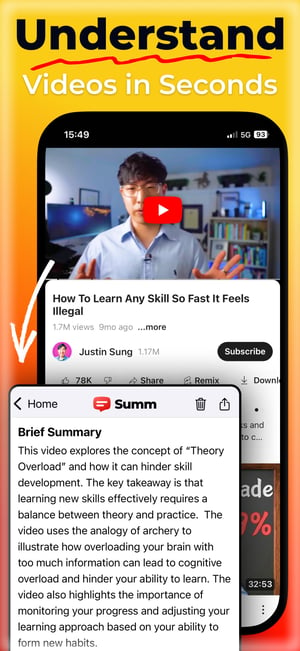
Summarize any video on your phone with Summ

Share a video from YouTube to Summ and get key points, chapters and timestamps in seconds. You can also listen to the summary.

Download on the Apple Store
Get it on Google Play
Screen 1Screen 2Screen 3Screen 4

Frequently asked questions

How do I turn a YouTube video into notes?⌄

Share the video to Summ or paste its link. Summ turns it into structured notes with key points and timestamps.

Is it good for studying?⌄

Yes. Students use Summ to review lectures, prepare for exams and catch up on missed classes.

Can I export my notes?⌄

You can copy or share any summary from the Summ app, and export the transcript as TXT, SRT or VTT.

Related

Example summaries